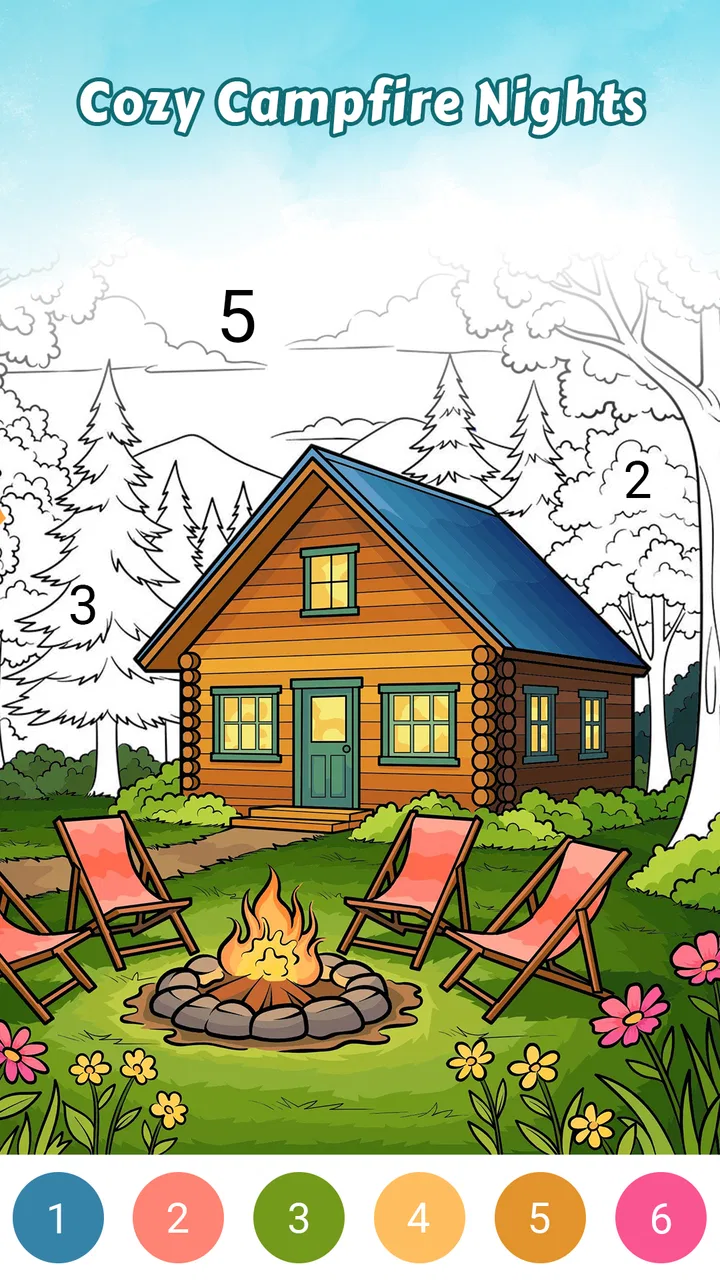
Country Living Color by Number
- 4.9
- Rating
- 10.00K
- Installs
- Free
- Price

 Analysis by App-foxy
I spent time with Country Living Color by Number as a quiet, tap-based board game built around coloring rustic country scenes. Its appeal is easy to understand: instead of managing a complicated puzzle or competing against a timer, I could settle into a picture, match numbered areas with colors, and gradually turn a plain outline into a warm-looking piece of art. The experience is gentle, accessible, and especially suited to short breaks when I want something more calming than demanding.
The game comes from ColorVerse Game Studio and is free to start. It is listed for Everyone, so the basic idea is approachable for children, adults, and older players who enjoy visual activities without complicated controls. The current release is version 1.0.5, and it runs on Android 7.0 or later. Its average rating is 4.9 from around 91 ratings, while the game has passed 10K+ installs. Those figures suggest a small but very positive early audience rather than a huge, established community.
How the everyday coloring workflow feels
The core routine is straightforward. I choose a country-living image, look for the areas assigned to the active color, and tap them one by one. As the picture fills in, the scene becomes easier to read: rustic objects, warm interiors, rural details, and familiar countryside elements gradually gain their final appearance. The pleasure comes from the transformation rather than from solving a difficult board.
You May Also Like

 AccuWeather: Weather Radar
AccuWeather Review: A Quick, Clear Forecast for Everyday Decisions
For everyday plans, the best forecast is the one you can understand quickly. AccuWeather makes rain timing, radar, and local conditions easy to act on, with a few trade-offs.

 Hill Climb Racing
Why Hill Climb Racing Still Turns Crashes Into One More Run
A tiny car, a bumpy hill and one more upgrade: Hill Climb Racing keeps resurfacing because its simple chaos makes every near-miss feel personal.

 AliExpress - Shopping App
AliExpress Makes Global Shopping Feel Personal, but Shoppers Bear the Risk
AliExpress turns a global marketplace into a pocket-sized discovery engine. Its reach is useful, its shopping loop compelling, and its trade-offs easy to miss.

 Lords Mobile: Kingdom Wars
Lords Mobile Is a Kingdom-Building Routine, Not a Quick Match
A case-by-case verdict on the building, battles, device demands, and social commitments that make Lords Mobile rewarding for some players and exhausting for others.

 PDF Scanner app - TapScanner
TapScanner Makes Paperwork Easier to Capture, Check, and Share
TapScanner makes scanning with a phone feel less like a rescue operation and more like a dependable step in getting work done. Its capture tools are useful, though not flawless.

 Block Blast!
 Shows How Much a Puzzle Game Can Leave Out
A quiet grid game shows why puzzle players increasingly value instant clarity, repeatable skill and low-pressure play—and where the genre still needs to catch up.
More From Our News Desk
View All News


That simplicity is a strength, but it also sets the right expectations. This is not a drawing app where I can freely select a brush, mix colors, or alter the composition. It is also not a traditional board game with turns, opponents, or strategic scoring. The board-like element is the organized layout of numbered spaces; the real activity is guided digital coloring.
My preferred way to use it was in small sessions. I would open a picture when I had a few quiet minutes, complete a group of nearby areas, and stop when my attention started to drift. Because the task is divided into many small taps, I did not need to remember a complicated state or prepare anything before playing. That makes it a good fit for a waiting room, a short commute as a passenger, or a wind-down routine before bed.
A realistic example is an evening when I want to put my phone down soon but still need a soft transition away from work. A demanding puzzle can leave me more alert, while this coloring format gives my hands something simple to do. I can focus on finding the remaining spaces, watch the scene become more complete, and close the game without feeling that I abandoned a long competitive match.
What to check before starting a picture
I found it more comfortable to begin by scanning the whole image instead of immediately tapping at random. Large areas are usually easier to recognize, and completing them first helps reveal the structure of the scene. After that, I move toward smaller details. This creates a repeatable rhythm: broad shapes first, decorative elements later, and tiny leftover spaces at the end.
When a color seems difficult to locate, I avoid repeatedly tapping the same visible object. I look around the edges of the picture and inspect areas with similar tones or patterns. Number-color games often make the final spaces less obvious because they are small or surrounded by completed sections. Treating the board as a visual search task, rather than as a race, reduces frustration.
Another useful habit is to change the way I hold the phone when working on detailed portions. In portrait orientation, the scene is easy to survey; when the artwork contains many small regions, I bring the device closer and use a slower tapping pace. I do not expect the game to replace a stylus or a large tablet, so patience matters more than speed on a compact screen.
The game is at its best when I accept that the completed image is the reward. If I approach every board as something to finish as quickly as possible, the repeated tapping can feel mechanical. If I treat each color group as a short visual exercise, the same structure becomes relaxing. That distinction is important for deciding whether this game suits you.
Settings and device habits that matter
There is no reason to overcomplicate the setup. Before playing for a longer session, I check the phone’s brightness and sound level rather than assuming the default arrangement will feel comfortable. A warm, lower brightness is easier on my eyes during evening use, while a brighter screen helps when the numbered sections are tiny. These are simple device habits, but they make a noticeable difference with detailed coloring.
I also keep notifications from interrupting a picture whenever I want a calmer session. A message appearing just as I am searching for a small area breaks the visual flow, especially because the game depends on concentration rather than dramatic action. For a short casual round this may not matter, but longer coloring sessions benefit from a quieter phone environment.
The free entry point is helpful for trying the style before spending anything. At the same time, in-app purchases range from $0.99 to $39.99 per item, so I would check the purchase screen carefully before confirming anything. The wide range means the game deserves the same spending awareness as any other free-to-start title. I would personally begin with the available free experience and only consider an optional purchase if I had already decided that the picture library and routine were worth supporting.
For families, the Everyone age rating makes the concept easy to introduce, but I would still explain that optional purchases exist. A child can understand the coloring quickly, yet the simplicity of the gameplay does not automatically make every store interaction child-proof. Setting a device-level purchase safeguard is sensible when younger players use the phone.
Faster patterns without losing the relaxing part
Experienced use is less about secret shortcuts and more about reducing unnecessary movement. I start with the currently selected color and complete the most visible areas before switching my attention elsewhere. If I jump between colors too often, I spend more time reorienting than coloring. Staying with one color for a while gives the session a clear pace and makes progress easier to notice.
I also divide a scene into zones. For example, I may finish the left side, then the center, then the right side instead of scanning the entire screen after every tap. This is particularly useful when the artwork contains many small rustic details. The zone method limits repeated searching and gives me natural stopping points if I only have a few minutes.
There is a trade-off between completing obvious spaces and chasing the last difficult ones. Finishing the easy sections quickly creates a satisfying visual change, but leaving tiny areas until the end can make the final stage feel slow. When I want a relaxed session, I mix both approaches: I clear a broad area, then solve one or two small details before returning to larger spaces. That keeps the board from becoming visually stale.
Another practical technique is to pause after a cluster of taps and inspect the whole picture again. Completed colors can change the contrast of neighboring spaces, making previously hidden numbers easier to notice. I found this more reliable than tapping repeatedly around a suspected location. It is a small habit, but it turns the end of a picture from guesswork into a calmer search.
I would not describe these habits as speed-running tools. They are ways to preserve attention and avoid needless tapping. Someone who wants a fast, score-driven challenge may still find the game too gentle. Someone who wants a more efficient coloring routine, however, can make each session feel smoother without changing the basic character of the game.
Where the format reaches its limits
The same guided structure that makes the game accessible can also make it feel repetitive. Every picture uses the familiar loop of locating numbered spaces and filling them with taps. If you want creative control, freehand drawing, custom palettes, or the ability to color outside the lines, this will feel restrictive. A dedicated drawing app is the better choice for those needs.
It may also be the wrong pick for players who need strong progression systems. I did not approach it expecting strategic depth, competitive play, or a demanding learning curve, and the experience makes more sense when judged as casual coloring. If your usual alternatives are logic board games, tactical card games, or traditional digital versions of chess and checkers, this offers a very different kind of engagement. It occupies the calming end of the board-game category rather than the strategic end.
Compared with physical coloring books, the phone version is cleaner and more convenient. I do not need paper, pencils, an eraser, or a place to store unfinished pages. On the other hand, physical coloring gives me more tactile control and a stronger sense of personal mark-making. Country Living Color by Number is better when convenience and guided completion matter; paper is better when the act of choosing and applying every color is itself the hobby.
Compared with general color-by-number games, the country-living theme gives this one a clearer identity. The scenes are aimed at warmth, rustic surroundings, and domestic countryside imagery rather than abstract patterns alone. That focus will appeal to players who like cozy visual subjects. It may be less attractive to someone looking for animals, fantasy landscapes, city scenes, or highly varied art styles.
The purchase structure is another point to consider. A free game with optional items can be easy to try, but players who dislike any form of in-app spending may prefer a paid coloring app with a simpler ownership model. I would not treat the presence of purchases as an automatic problem, yet I would make my choice based on how much content is available without paying and whether the optional items fit my personal budget.
Who will enjoy it most
I would recommend this game to people who like quiet visual routines, cozy rural imagery, and progress that is immediately visible. It works well for casual players who do not want to learn rules before starting. It can also suit families looking for an approachable activity, provided an adult handles purchase controls on shared devices.
It is especially suitable for short, repeatable breaks. I can imagine using it after lunch, during a pause between errands, or while listening to a podcast that does not require full visual attention. The taps are simple enough that the game does not compete with a complex strategy plan, although I would still avoid using it when I need to concentrate fully on another task.
I would skip it if I need a strong challenge every time I play. The game’s satisfaction comes from completion, color, and atmosphere, not from mastering difficult rules. I would also skip it if I want to create original artwork, share a personal drawing process, or manipulate every visual choice myself. In those cases, a drawing tool or a more open-ended art app would provide more control.
My verdict after settling into the routine
Country Living Color by Number succeeds because it keeps its promise narrow and understandable. It gives me rustic scenes to complete through simple taps, and it does not demand the commitment of a complex board game. The best results come from using it intentionally: adjust the phone for comfortable viewing, work through one color or zone at a time, and treat the final small spaces as part of the relaxation rather than an obstacle.
Its limitations are equally clear. The guided format can become repetitive, the phone screen is not ideal for every tiny detail, and players seeking strategy or free expression will outgrow it quickly. The optional purchases also mean I would pay attention before confirming anything, particularly on a shared family device. Those are reasonable trade-offs for a free-to-start coloring game, but they should be part of the decision.
For me, the strongest reason to install it is the combination of a cozy theme and a low-pressure workflow. The 4.9 average from around 91 ratings reflects a very positive response from its early audience, while the 10K+ install level suggests it remains a relatively small title. I would recommend giving it a try if you want a calm country-themed activity and are comfortable with the limits of color-by-number gameplay.
My final recommendation is simple: choose it for gentle visual downtime, not for competition or artistic freedom. Used in short sessions with a few practical habits, it becomes an easy companion for quiet moments. If that sounds like the kind of game you want, ColorVerse Game Studio has built a focused experience that is pleasant to return to.
FAQs for Country Living Color by Number
01What is Country Living Color by Number?
Country Living Color by Number is a relaxing digital coloring app inspired by countryside scenes, homes, gardens, animals, and other rural-themed artwork. Users select an illustration and fill numbered sections with the matching colors. It is designed for casual play, creative relaxation, and short sessions, making it suitable for people who enjoy coloring without needing traditional art supplies or advanced drawing skills.
02How does the coloring system work?
The app uses a paint-by-number format. Each image is divided into numbered areas, and a color palette indicates which shade belongs in each section. You can tap the correct areas to complete the artwork, while hints may help locate small or difficult sections. The controls are generally easy to understand, although detailed pictures can require patience when working on tiny spaces.
03Can I use Country Living Color by Number without an internet connection?
Some basic features or previously loaded artwork may remain available offline, but the exact experience can depend on the version installed and how the app delivers new content. Internet access may be required for downloading additional coloring pages, displaying advertisements, synchronizing progress, or using optional online features. It is best to open the app online at least once before relying on it during travel.
04Is Country Living Color by Number free to download?
The app can generally be downloaded without an upfront purchase, but free access may include advertisements, optional purchases, or limitations on certain artwork and features. Before confirming any transaction, review the pricing and subscription details shown in the app store and inside the application. Parents should also check purchase settings, especially if children may use the device.
05Is Country Living Color by Number suitable for children and adults?
The simple tap-based controls make the app accessible to both children and adults who enjoy coloring activities. However, age suitability can vary because of advertising, in-app purchases, privacy practices, and the complexity of some illustrations. Parents should review the store rating and permissions, enable purchase restrictions when appropriate, and supervise younger users when advertisements or external links are displayed.
Pros
- Relaxing coloring sessions suitable for short or extended breaks.
- Country-themed artwork offers a distinctive alternative to generic coloring apps.
- Simple controls make coloring accessible for beginners and casual users.
- Completed pictures can provide a satisfying sense of progress.
- Works well as a quiet
- low-pressure creative activity.
Cons
- Some detailed designs may require considerable time to complete.
- Small sections can be difficult to select accurately on smaller screens.
- The color-by-number format limits freehand artistic expression.
- Repeated coloring tasks may feel monotonous over longer sessions.
- Ads or optional purchases may interrupt the otherwise relaxing experience.

Country Living Color by Number
Gallery